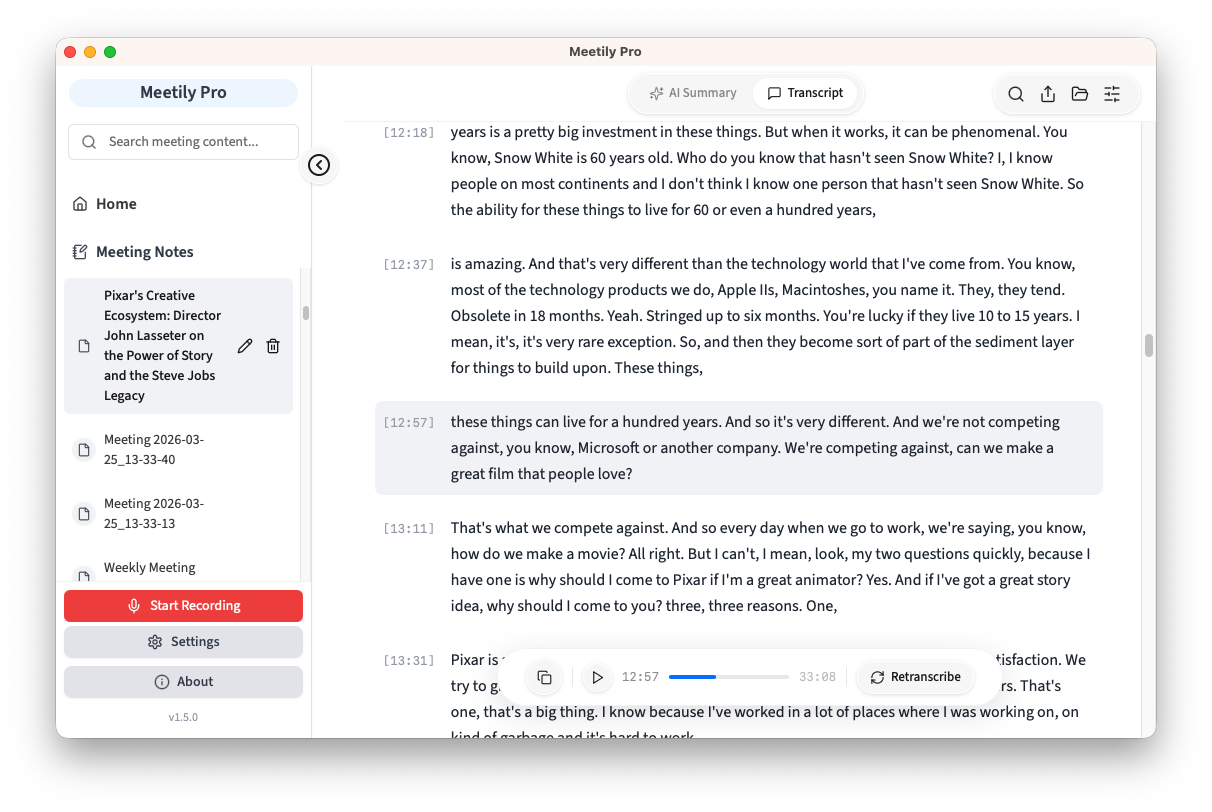
Bot-Free Meeting Recording: No Bots Join Your Calls
Bot-free meeting recording captures audio directly from your device without any AI participant joining your call. Meetily transcribes locally using on-device AI, keeping conversations private and meeting flow natural. Works with Zoom, Teams, Google Meet, and any other platform.
Install a desktop recorder that captures system audio from your own machine instead of joining your call as a participant. Open Meetily on macOS or Windows, click record, then start your Zoom, Microsoft Teams, or Google Meet call as normal. The app pulls audio from the same stream that reaches your speakers, so no AI participant ever appears in the attendee list. Transcription runs locally with Whisper or Parakeet models. 599,000+ users have downloaded Meetily for exactly this workflow as of May 2026.
How to build a botless meeting recorder
A botless recorder needs three pieces: an OS-level system audio capture layer (CoreAudio tap on macOS, WASAPI loopback on Windows), a mic capture stream mixed against it, and a local speech-to-text engine. OpenAI's Whisper paper (2022) showed multilingual ASR can run fully on-device with strong accuracy across 99 languages, which is why Meetily ships Whisper plus Parakeet as the two engines. The full reference implementation is open source under MIT at github.com/Zackriya-Solutions/meetily (31K+ stars, 3,391+ forks as of May 2026).
How to record and transcribe Zoom, Google Meet, and Microsoft Teams without a bot in 2026
Use a system-audio recorder rather than a meeting-app integration. The same workflow covers all three platforms because Zoom, Google Meet, and Microsoft Teams all route call audio through your operating system's audio stack. Open Meetily, grant the OS permission to capture system audio (Screen Recording on macOS, none on Windows), then start your call. Audio captures and transcribes locally on your device. No bot is added to the meeting, no platform integration is configured, and the same binary works across all three platforms in 2026.
How to record a meeting without a bot while you are in the meeting
Click record on your desktop recorder before joining, or any time during the call. Because Meetily captures audio from your local system rather than joining as a participant, recording starts and stops without notifying the host or other attendees. There is no participant list change, no chime, no banner. Your microphone and the inbound system audio are both captured, so the full conversation is on the transcript. Transcription updates live during the call and the final transcript and AI summary are available the moment you stop recording.
How to record Zoom, Google Meet, and Microsoft Teams audio locally without a bot
Local recording means audio bytes never leave your device. Meetily writes the raw audio file to a folder on your machine and runs Whisper or Parakeet on the same machine to produce the transcript. Nothing is uploaded for transcription. For summaries you choose between a local Ollama model or your own Claude or OpenAI API key (transcript text only, no audio, opt-in per meeting). The Community Edition is MIT-licensed and free; Pro is $10/user/month billed annually with priority support.
What is bot-free?
Bot-free, in the meeting recording context, means an AI note-taker that does not join your call as a visible participant. Bot-based tools (Otter, Fireflies, Read.ai) dial in to your meeting under a name like “Notetaker” or “Fathom Notetaker”, which appears in the participant list and uploads audio to vendor cloud servers. Bot-free tools record audio from your own device through the operating system, so no third-party participant is added and no audio leaves your machine for transcription. The term gained search traction during 2025 alongside privacy-first meeting tooling.
What is a bot-free meeting recorder?
A bot-free meeting recorder is a desktop application that records and transcribes meeting audio without sending an AI participant to your call. It captures system audio (the audio your computer plays through speakers) and microphone audio locally, then runs speech recognition on the device. Examples in the open-source space include Meetily, which is MIT-licensed with 31K+ GitHub stars and 599,000+ downloads as of May 2026. The category is distinct from bot-based recorders (Otter, Fireflies, Read.ai) which dial into the call as a visible participant and upload audio to vendor servers.
Traditional meeting recorders add visible bots to your calls. Meetily takes a different approach.
Invisible Recording
No bot or AI participant joins your meeting
Other attendees see only human participants
Recording happens silently on your device
Local-First Processing
Transcription runs on your device by default, using Whisper and Parakeet models
Audio never leaves your machine
For summaries, choose local AI or your own API key
Compliance by Design
Local processing with no third-party data access
Supports GDPR and HIPAA compliance requirements by design
Full data sovereignty on your infrastructure
What Is the Difference Between Bot-Based and Bot-Free Recording?
Bot-based recorders add an AI participant to your calls. Bot-free recorders capture audio from your device. Here is what that means in practice.
Bot-Based Recording
✗AI bot joins as a visible meeting participant
✗All attendees see the bot in the participant list
✗Audio uploaded to cloud servers for processing
✗Requires platform-specific integrations
✗Meeting hosts can block or remove the bot
✗Changes meeting dynamics and participant behavior
Bot-Free Recording (Meetily)
✓No bot or AI participant joins the meeting
✓Completely invisible to other attendees
✓Audio processed locally on your device
✓Works with any meeting platform automatically
✓Cannot be blocked by hosts or IT admins
✓Zero disruption to natural meeting flow
Feature comparison: bot-free recording (Meetily) vs bot-based meeting recorders
Feature
Bot-Free (Meetily)
Bot-Based Recorders
Meeting Participant
No bot joins
Bot visible to all
Data Processing
Local transcription
Cloud servers
Platform Support
Any platform
Integration required
Host Can Block
No
Yes
Meeting Disruption
Zero
Bot notifications
Offline Support
Full offline
Requires internet
Source Code
Open source (MIT)
Proprietary
Cost
Free (Community)
Typically $10-40/month
Who Benefits From Bot-Free Meeting Recording?
Bot-free recording solves real problems for professionals who need privacy, reliability, and seamless meeting experiences
Healthcare & Legal Teams
Record patient consultations, legal depositions, and privileged conversations without a visible bot that could compromise confidentiality or create compliance concerns.
Executive & Board Meetings
Capture strategy sessions, investor calls, and board discussions without alerting participants to recording. Sensitive business decisions stay private and local.
Sales & Client Calls
Record prospect calls without the awkwardness of a 'Notetaker Bot' joining and changing the conversation dynamic. Focus on the relationship, not the tool.
Remote & Hybrid Teams
Works with any meeting platform your team uses - Zoom, Teams, Google Meet, WebEx, Slack, or any other tool. No integrations to configure or maintain.
Regulated Industries
Financial services, government, and defense organizations need recording solutions that keep data on-premises. Bot-free local processing meets strict data residency requirements.
Individual Professionals
Freelancers, consultants, and researchers who need meeting notes without paying $10-40/month. Meetily Community Edition is free and open source.
How Does Bot-Free Meeting Recording Work?
Three steps to silent, private meeting recording
1. Download Meetily
Install the desktop app for Windows or macOS. No account creation, no sign-up, no cloud setup required. Ready to use in under 2 minutes.
2. Join Your Meeting Normally
Start your Zoom, Teams, or Google Meet call as usual. Click record in Meetily. No bot joins your call - recording is completely invisible to other participants.
3. Get Transcription & Notes
Meetily transcribes audio locally using AI models on your device. Review your transcript, get AI-generated summaries, and export notes. With local AI, everything stays on your machine.
Trusted by Professionals Who Value Privacy
Join a growing community of users who chose bot-free recording
Install a desktop recorder that captures system audio from your own machine instead of joining your call as a participant. Open Meetily on macOS or Windows, click record, then start your Zoom, Microsoft Teams, or Google Meet call as normal. The app pulls audio from the same stream that reaches your speakers, so no AI participant ever appears in the attendee list. Transcription runs locally with Whisper or Parakeet models. 599,000+ users have downloaded Meetily as of May 2026.
A botless recorder needs three pieces: an OS-level system audio capture layer (CoreAudio tap on macOS, WASAPI loopback on Windows), a mic capture stream mixed against it, and a local speech-to-text engine. As OpenAI's Whisper paper (Radford et al., 2022) put it, multilingual ASR can run fully on-device with strong accuracy across nearly 100 languages, which is why Meetily ships Whisper plus Parakeet as the two engines. The full reference implementation is open source under MIT at github.com/Zackriya-Solutions/meetily (31K+ stars, 3,391+ forks as of May 2026).
Use a system-audio recorder rather than a meeting-app integration. The same workflow covers all three platforms because Zoom, Google Meet, and Microsoft Teams all route call audio through your operating system's audio stack. Open Meetily, grant the OS permission to capture system audio (Screen Recording on macOS, none on Windows), then start your call. Audio captures and transcribes locally on your device. No bot is added to the meeting, no platform integration is configured, and the same binary works across all three platforms in 2026.
Click record on your desktop recorder before joining, or any time during the call. Because Meetily captures audio from your local system rather than joining as a participant, recording starts and stops without notifying the host or other attendees. There is no participant list change, no chime, no banner. Your microphone and the inbound system audio are both captured, so the full conversation is on the transcript. Transcription updates live during the call and the final transcript and AI summary are available the moment you stop recording.
Local recording means audio bytes never leave your device. Meetily writes the raw audio file to a folder on your machine and runs Whisper or Parakeet on the same machine to produce the transcript. Nothing is uploaded for transcription. For summaries you choose between a local Ollama model or your own Claude or OpenAI API key (transcript text only, no audio, opt-in per meeting). The Community Edition is MIT-licensed and free; Pro is $10/user/month billed annually with priority support.
Bot-free, in the meeting recording context, means an AI note-taker that does not join your call as a visible participant. Bot-based tools (Otter, Fireflies, Read.ai) dial in to your meeting under a name like Notetaker, which appears in the participant list and uploads audio to vendor cloud servers. Bot-free tools record audio from your own device through the operating system, so no third-party participant is added and no audio leaves your machine for transcription. The term gained search traction during 2025 alongside privacy-first meeting tooling.
A bot-free meeting recorder is a desktop application that records and transcribes meeting audio without sending an AI participant to your call. It captures system audio (the audio your computer plays through speakers) and microphone audio locally, then runs speech recognition on the device. Examples in the open-source space include Meetily, which is MIT-licensed with 31K+ GitHub stars and 599,000+ downloads as of May 2026. The category is distinct from bot-based recorders (Otter, Fireflies, Read.ai) which dial into the call as a visible participant and upload audio to vendor servers.
Recording laws vary by jurisdiction. In one-party consent regions you can record calls you participate in. In two-party consent regions all parties must agree. Bot-free recording does not change the legal requirements - it simply removes the visible bot that alerts others. As the EFF has long argued in surveillance law commentary, the legality of recording turns on consent rules in your jurisdiction, not on the visibility of the recording tool. Always follow your local recording laws and organizational policies.
No. Unlike bot-based recorders that can be blocked by meeting hosts or IT administrators, bot-free recording captures audio from your own device. There is no external participant to block. This makes it reliable for every meeting regardless of platform settings.
Yes. Bot-free recording is suited for confidential meetings - legal consultations, medical discussions, executive strategy sessions, HR conversations, and financial reviews. No bot joins the call, and audio never leaves your device. When using local AI models, no third party accesses your data. Meetily supports GDPR and HIPAA compliance by design.
Yes. Meetily Community Edition is free and open source under the MIT license. It includes bot-free recording, local transcription, and AI summaries at no cost. Pro is available at $10/user/month billed annually for additional features like advanced summary options and priority support.
Record Meetings Without Bots
Free for individuals. Pro from $10/user/month billed annually. Download and start recording in under 2 minutes.
✅ No Meeting Bots · ✅ Local Transcription · ✅ Free & Open Source · ✅ GDPR & HIPAA Compliant by Design
Why Choose Meetily Pro?
Privacy-First Architecture
Transcription runs 100% locally; recordings and audio never leave your device. For summaries, you choose your provider: local AI or your own API key. Compliant by design with GDPR and HIPAA workflows.
Advanced AI Features
Real-time transcription, speaker identification, action item extraction, meeting summaries, and custom AI workflows.
Priority Support
Dedicated support team, direct access to engineers, custom integration assistance, and priority bug fixes.
Flexible Deployment
On-Device deployment. Local file access for custom integrations and workflows.